Update Factory - Fleet Management System
What Is Update Factory and Why Does It Matter for Embedded Systems?
Managing software updates on embedded devices is fundamentally different from updating a mobile phone or a desktop application. Embedded devices — kiosks, industrial controllers, medical instruments, automotive infotainment units, IoT sensors — often run in the field without a local administrator, in environments where connectivity is intermittent, and where a failed update cannot be retried by hand. Getting software onto these devices reliably and safely, at scale, is one of the most operationally complex challenges in any embedded product lifecycle.
Update Factory is Kynetics' cloud-based platform designed specifically for this problem. It provides a complete Over-The-Air (OTA) update scalable infrastructure for Android and Linux embedded devices, covering the full lifecycle: uploading software artifacts, organizing them into versioned distributions, targeting individual devices or entire fleets, monitoring update progress, and recovering from failures — all from a central web-based dashboard and API that allows to manage tasks also by the use of a MCP and consequently AI agents.
This is the first in a series of Technical Notes dedicated to Update Factory. It offers a conceptual introduction to what the platform does, who it is for, and what use cases it covers. Subsequent articles will go deeper into specific features such as rollout strategies, the Android client integration, and Device Control Update (DCU). DCU in particular defines what can be called IoT as Code.
At a glance
- Product: Update Factory — OTA update platform by Kynetics
- Supported OS: Android (AOSP-based) and Linux (Yocto/SWUpdate/RAUC)
- Architecture: Cloud server · Web Management UI · On-device client
- Key use cases: Firmware updates · App deployment · Fleet rollouts · Remote device management · Remote device access
- Tiers: Personal (Free / Development) and Business (PoC / Expansion / Commercial)
- Learn more: kynetics.com/ota-updates-android
- Documentation: https://docs.updatefactory.io/
What Problem Does Update Factory Solve?
Field-deployed embedded devices create several interconnected operational challenges that every embedded product team eventually faces:
How do you get new software onto devices that are already deployed?
Once a device is in the field, physical access to re-flash it is expensive or impossible. Update Factory gives each device a persistent, authenticated connection to the cloud platform. Whenever a new update is ready, the device polls the server, downloads the artifacts, installs them, and reports the result back — without any manual intervention.
How do you do this reliably across hundreds or thousands of devices?
Field devices fail, lose connectivity, or vary in hardware configuration. Update Factory supports resumable downloads, configurable retry logic with exponential backoff, and per-device deployment tracking. Operators can see the exact status of every device in the fleet from a single dashboard.
How do you avoid breaking the entire fleet with a bad update?
Update Factory's rollout mechanism allows fleet updates to be staged across groups of devices, with configurable success and error thresholds. If a percentage of devices in one group report failures, the rollout automatically halts before affecting the rest of the fleet.
How do you change device configuration without triggering a full system update?
Not every operational change requires a new firmware build. Update Factory's Device Control Update (DCU) feature solves exactly this: it lets operators push configuration changes — or execute device-side actions like factory resets, settings adjustments, cache clearing, or custom scripts — through an extremely small payload, entirely bypassing the cost and risk of a system or incremental update.
How do you access a single remote device for debugging or monitoring?
Physically reaching a field device for diagnosis is often impractical. Update Factory provides secure remote access to individual devices, including remote screen export for visual inspection, SSH for command-line access on Linux devices, and Android ADB tunneling for app debugging — all without requiring a VPN or direct network route to the device.
How Is Update Factory Structured?
The platform consists of three layers that work together.
The Update Factory Cloud
The cloud component is the central hub. It stores software artifacts on a Content Delivery Network (CDN), exposes a Device-Directed Interface (DDI) API that on-device clients communicate with, and provides a Management API for REST-based automation. Two service tiers are available: the Personal Tier for development and evaluation (Free and Development plans), and the Business Tier for production deployments (PoC, Expansion, and Commercial plans). All Update Factory services are accessible under the *.updatefactory.io domain, making network allowlisting on managed devices straightforward.
The Management UI
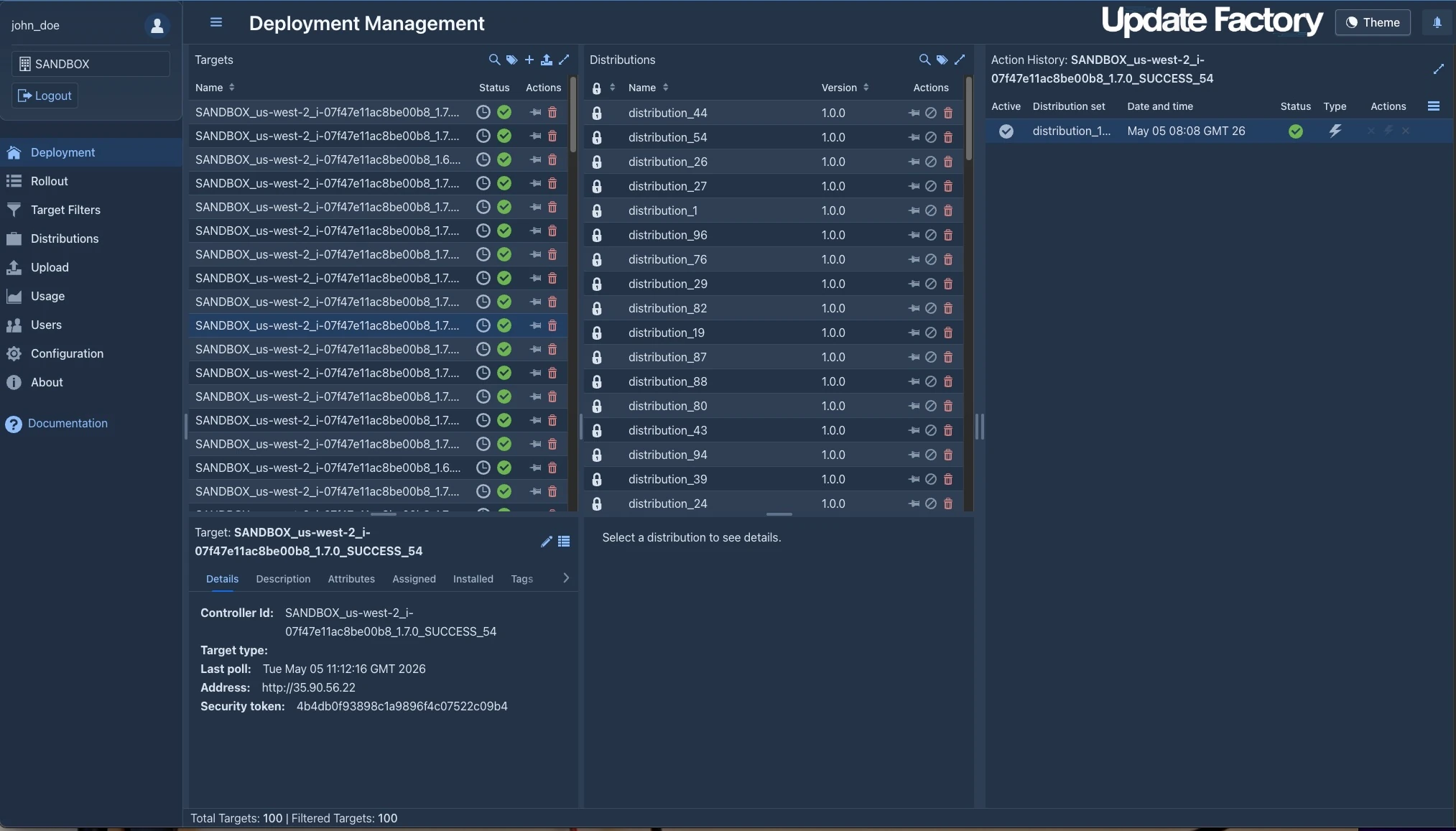
The Management UI is a browser-based web application where operators manage everything: uploading artifacts, creating distributions, targeting devices, launching rollouts, monitoring progress, and configuring the platform. It is organized into dedicated views — Deployment, Distributions, Rollout, Target Filter, Upload, Usage, and User Management — each covering a specific stage of the update workflow. Access requires Multi-Factor Authentication (MFA), with a six-digit code sent by email at each login.
The On-Device Client
On the device side, a lightweight client runs as a background service. It authenticates with the cloud, polls for new instructions, downloads artifacts, and executes the update. Kynetics provides two reference implementations:
- UF-Service (Android) — an Android service that manages all the tasks on the remote target by securely installing OTA packages, APK and DCU on Android-based embedded devices. The service exposes an API (
uf-service-api) that allows the kiosk based host applications to monitor and control the update lifecycle. - Linux client — integrations based on SWUpdate and RAUC, two widely used open-source update frameworks, with Yocto integration layers provided by Kynetics for both.
What Are the Main Use Cases for Update Factory?
Updating a Single Device or a Small Group
The most immediate use case is pushing a software update to a specific device or a small number of devices during development or testing. In the Deployment View, the operator selects one or more registered target devices and drags a pre-configured Distribution onto them. The device receives the update instruction on its next poll cycle, downloads the artifacts, installs them, and reports the result back to the dashboard.
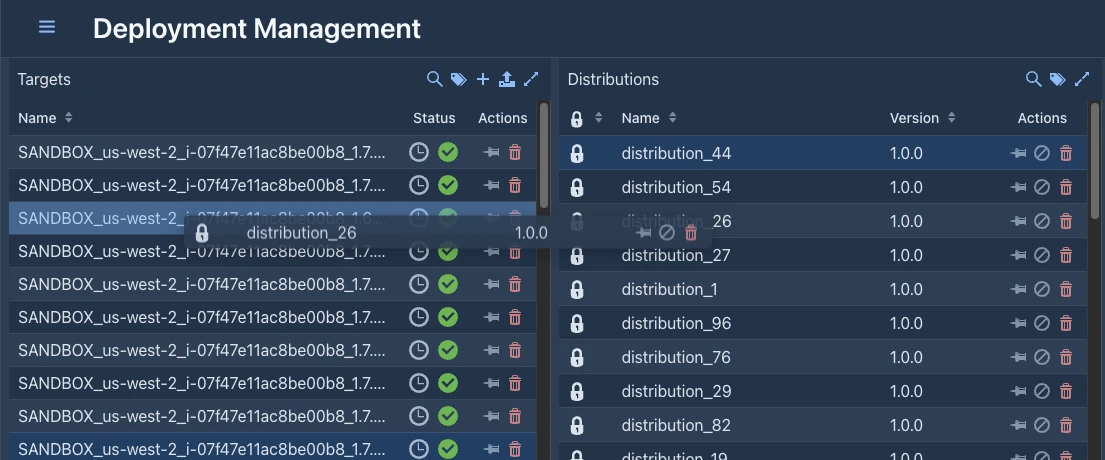 This workflow is well-suited for:
- Development iterations where the engineer wants to push a new build to a specific test board
- Customer-specific updates where a defined subset of devices needs a configuration change
- Emergency patches that must be delivered to selected devices immediately
Updating an Entire Fleet with Rollouts
For production deployments across a large number of devices, the Rollout View provides a more structured and controlled mechanism. An operator creates a rollout by selecting a Distribution and a Target Filter — a saved query that matches a specific set of registered devices. The rollout then pushes the update to all matching devices according to a configurable deployment strategy.
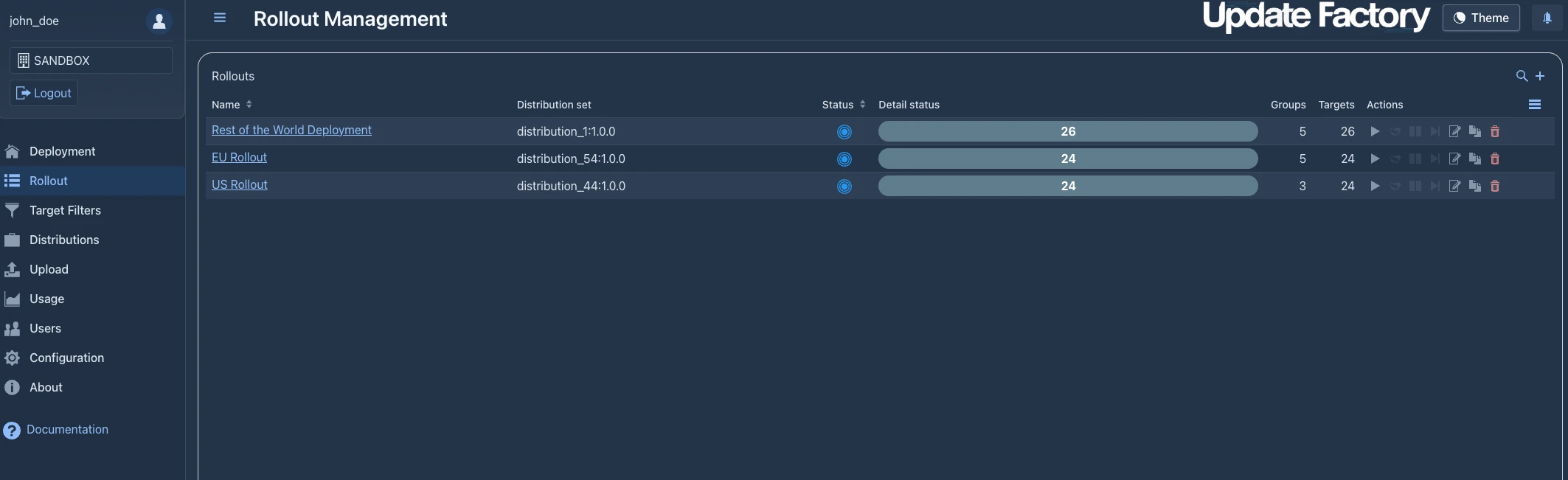
Key rollout parameters include:
- Action type: Forced (install immediately), Soft (install only upon explicit authorization from the device application), or Time-Forced (soft until a configurable deadline, then forced automatically).
- Start type: Manual (operator triggers the rollout), Automatic (starts immediately on save), or Scheduled (starts at a specific date and time).
- Groups and thresholds: The target device set can be split into groups — for example, 10 % of devices first, then 50 %, then 100 %. Each group has a configurable trigger threshold (the minimum success rate required before the next group starts) and an error threshold (the maximum failure rate before the entire rollout is halted).
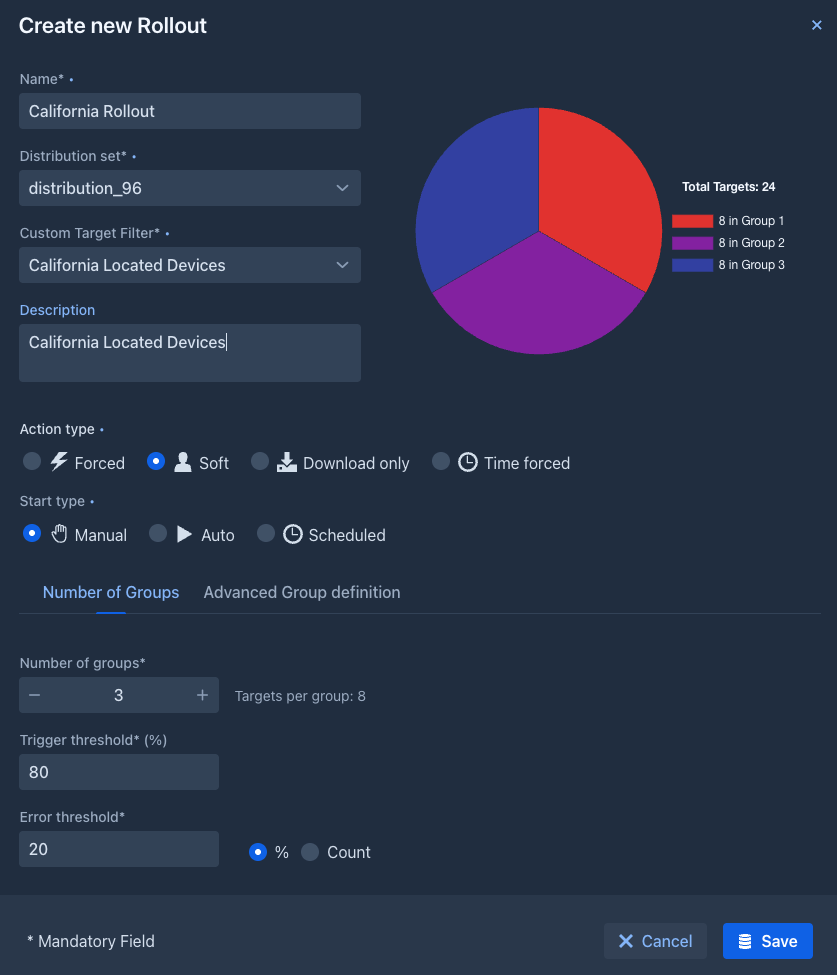
This staged approach dramatically reduces risk in production deployments. A defect in a new firmware version will surface in the first device group before it propagates to the rest of the fleet.
Managing Devices Beyond Firmware — Device Control Update (DCU)
One of the most distinctive capabilities in Update Factory is the Device Control Update (DCU) mechanism. Standard OTA updates replace firmware images or install application packages. DCU extends this to cover arbitrary device management tasks executed remotely through the Update Factory platform.
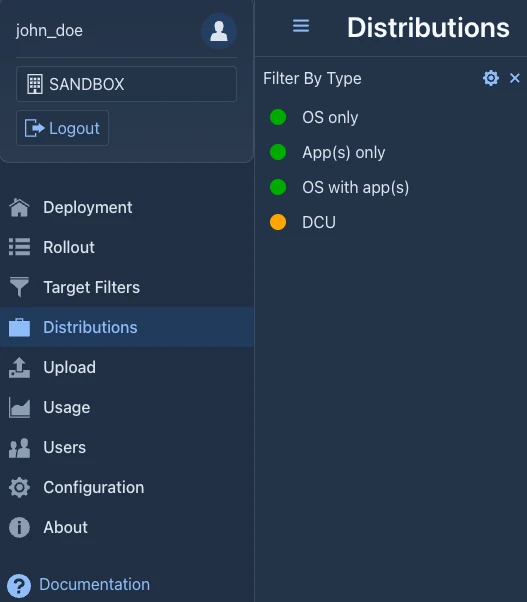
A DCU application is a purpose-built Android app that UF-Service installs, executes, and optionally uninstalls — all orchestrated from the Management UI. This enables use cases that go well beyond software versioning:
- Remote reboots — restart a device on a schedule or on-demand, without physical access
- Factory resets — wipe user data and restore factory state across a fleet of devices
- Configuration changes — update Wi-Fi credentials, modify system settings, or push new application configuration files
- Cache management — clear application or system caches to resolve persistent storage issues
- Custom maintenance tasks — any device-specific operation that can be scripted as an Android application
DCU transforms Update Factory from a software distribution channel into a general-purpose remote device management platform. For operators maintaining large fleets of unattended devices, this is a qualitatively different capability from what traditional OTA systems offer.
Deploying Android Applications Alongside Firmware
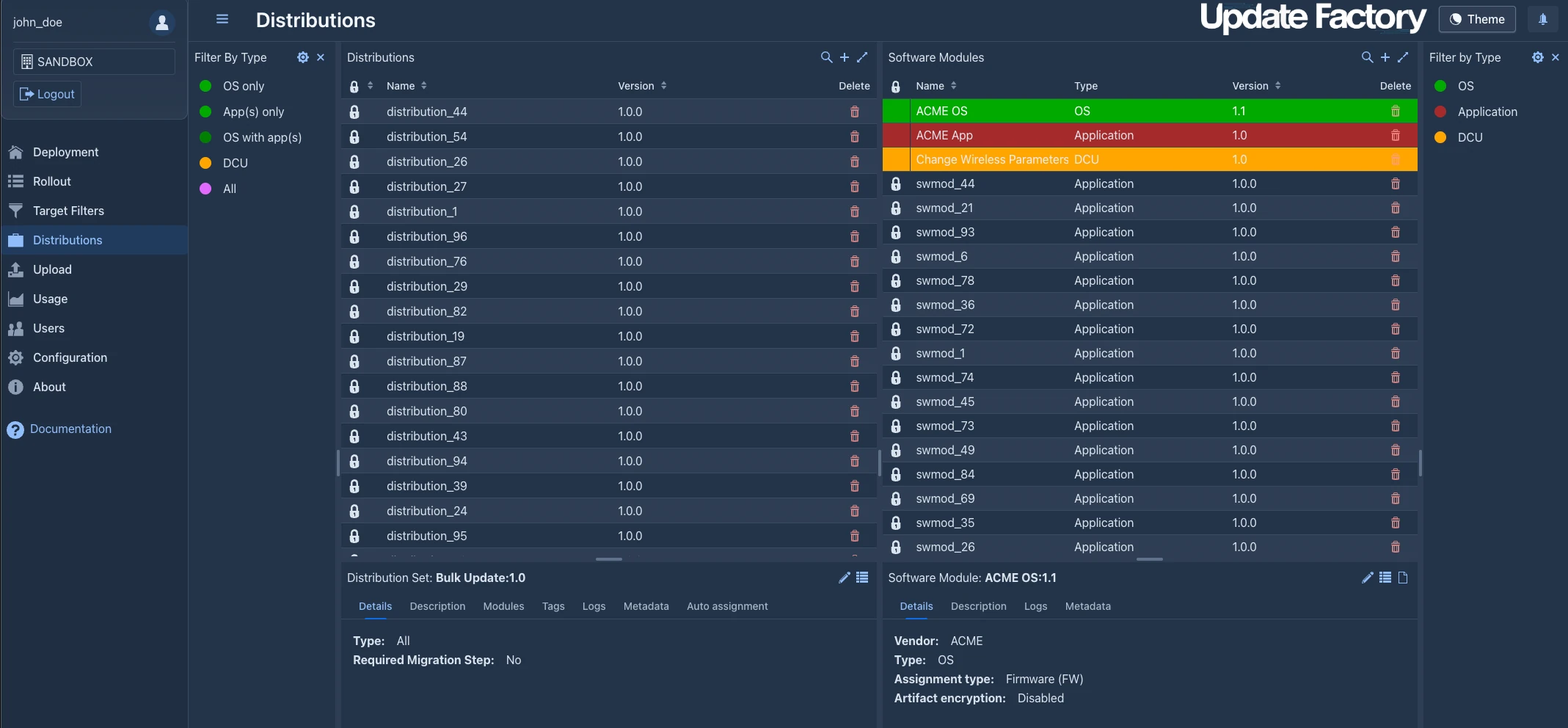
Update Factory natively supports three types of software payloads: OS-level updates (full system images or A/B OTA packages that replace system partitions), application updates (APK packages installed on top of the running OS) and Device Control Updates. All of them can be combined into a single Distribution and deployed in one coordinated operation.
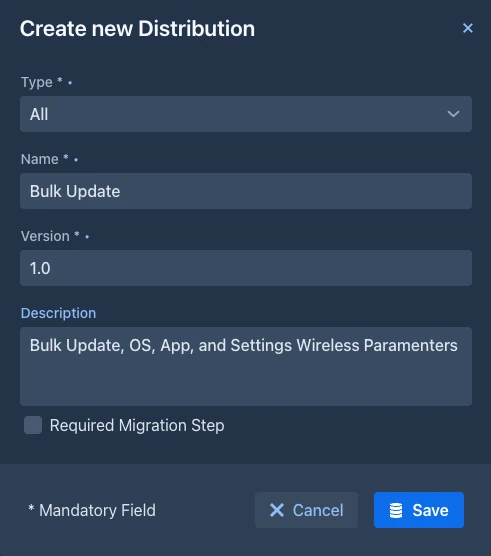
A single rollout can therefore update the Android firmware, deploy a new version of the main application, and push a configuration file — all as one tracked, atomic operation visible in the dashboard.
Integrating OTA into a CI/CD Pipeline
For teams that build and release frequently, manually uploading APKs to the Management UI after every build is impractical. The ufApkDelivery Gradle plugin provided by Kynetics bridges the gap between the Android build system and Update Factory. By adding the plugin to a Gradle project, the deliveryApk task uploads freshly built APKs directly to the Update Factory tenant as part of the standard build process — making OTA delivery a natural step in the CI/CD pipeline.
This is particularly valuable for DCU applications, where new versions may be produced and validated multiple times per day during development and QA cycles.
How Does Update Factory Organize Devices and Target Them for Updates?
Target Filters and Device Tags
Devices are registered in Update Factory with a unique Controller ID — typically the device serial number or a hardware identifier. Each device can carry metadata: tags, descriptions, target types, and custom key-value attributes reported by the client. Operators use the Target Filter View to create saved queries — for example, "all devices tagged retail-kiosk in error state that have not yet received distribution v2.4" — and reuse those filters across deployments and rollouts.
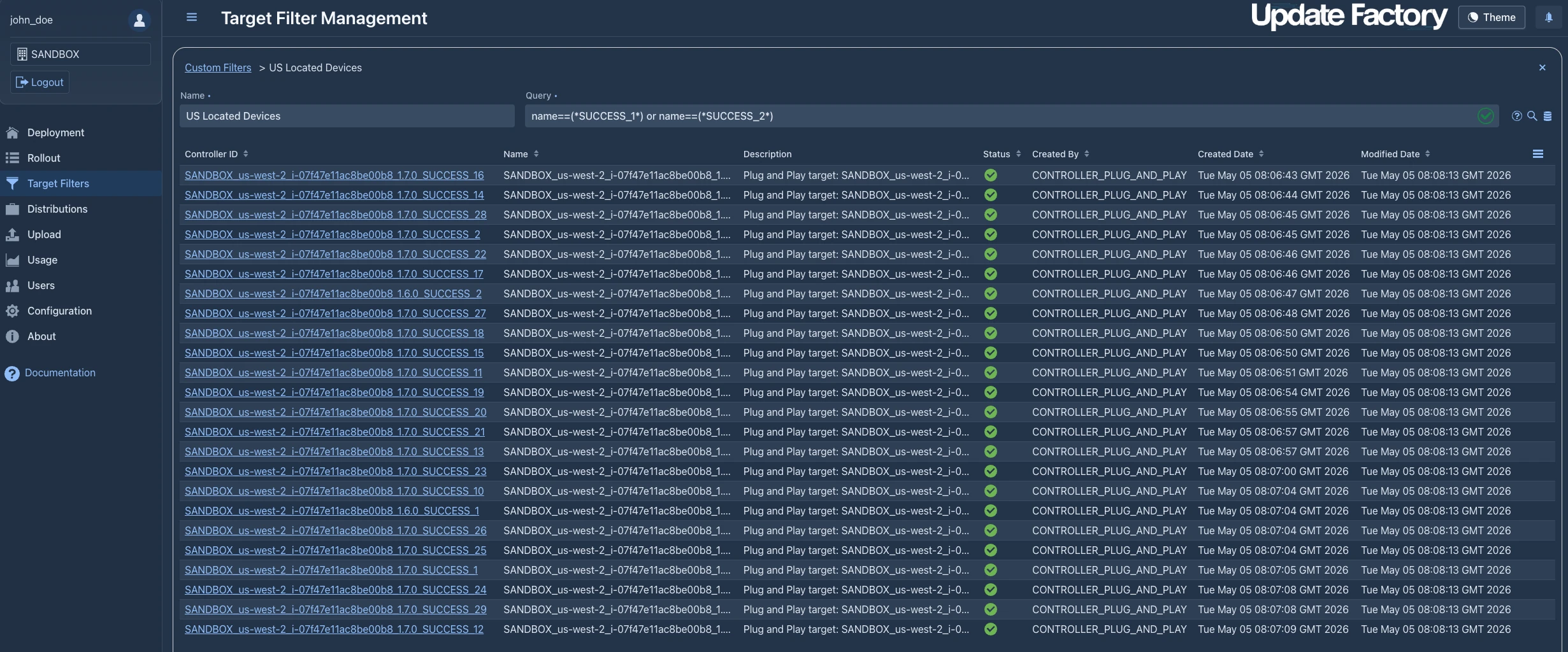
This query-based targeting system allows precise control over which devices receive which updates, without requiring the operator to manually select devices from a list each time.
Distributions and Software Modules
A Distribution in Update Factory is the deployable unit — a named, versioned bundle of one or more Software Modules. A Software Module holds the actual artifact files (firmware images, APKs, configuration packages) and is typed as OS, Application, or a custom category. Once a Distribution is assigned to a target device for the first time, it is automatically locked: no artifacts can be added or removed, and no Software Module can be changed.
This immutability is a deliberate design choice. A Distribution represents a precise, known software state. Allowing modifications mid-rollout would make it impossible to reason about what software is running on which device — exactly the situation that makes fleet management unreliable.
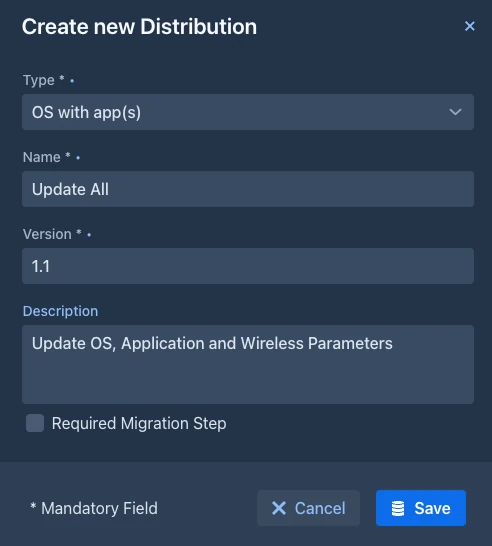
If iteration is needed during testing, the recommended approach is to create new versioned distributions (for example 1.6-beta1, 1.6-beta2) rather than attempting to modify an already-deployed one.
Distribution Types
Distributions can be filtered and categorized by type — Application-only, OS-only, OS with Applications and any custom defined Distribution type. This makes it straightforward to locate the right artifact when managing a large software catalog with multiple product lines or hardware variants.
How Does Update Factory Support Android and Linux Devices?
Android Devices
For Android devices, Kynetics provides the UF-Service which runs as a privileged background service. It communicates with the Update Factory server over HTTPS, downloads update artifacts from the CDN (with support for resumable partial downloads), and installs them using the Android PackageManager for APKs or the Android UpdateEngine for A/B OTA packages.
UF-Service supports both Soft and Forced deployment modes, giving the on-device application control over when an update is actually applied. This is important for devices that must complete a current operation before rebooting — for example, a kiosk in the middle of a customer transaction, or an industrial controller managing a running process.
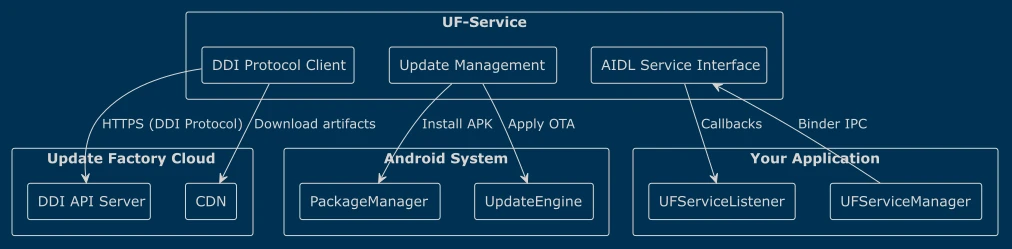
The uf-service-api library exposes the full update lifecycle to the host application: download progress events, authorization requests, current service state, and configuration management. Everything in the update process can be managed by your own background maintenance services or kiosk applications.
Linux Devices
For Linux-based embedded devices, Update Factory integrates with SWUpdate and RAUC — two widely adopted open-source frameworks for embedded Linux OTA updates. Kynetics provides Yocto integration layers for both, configuring them to connect to the Update Factory backend and enabling the same fleet management workflows available for Android devices. Full and delta image updates, as well as multi-image configurations across multiple storage partitions, are supported.
What Subscription Tiers Does Update Factory Offer?
Update Factory is available on two service tiers, each with multiple plans:
Personal Tier — designed for individual developers, evaluation, and early-stage development:
| Plan | Typical use |
|---|---|
| Free | Initial exploration, personal prototyping |
| Development | Active development with expanded device and storage limits |
Business Tier — designed for commercial projects and production deployments:
| Plan | Typical use |
|---|---|
| PoC | Proof-of-concept with customer involvement |
| Expansion | Scaling an existing production deployment |
| Commercial | Full production with SLA and professional support |
All tiers provide access to the same Management UI and DDI infrastructure. The differences between plans relate to the number of managed devices, available storage, and data transfer bandwidth.
How Does Update Factory Fit into the Kynetics Embedded Android Ecosystem?
Update Factory is one of three pillars of the Kynetics Embedded Android Developer Toolkit (EADT):
- Embedded Android OS — a production-ready Android BSP optimized for the target hardware
- Embedded SDK — an API layer giving Android applications direct access to hardware buses (GPIO, I2C, SPI, CAN, UART, RS-485)
- Update Factory — the OTA update platform that keeps the OS and applications current throughout the product lifecycle
When Kynetics delivers an Android BSP to a customer, Update Factory is pre-integrated into the image. From the very first boot, the device is already capable of receiving software updates from the cloud — no additional integration work is required for the basic use case.
For production deployments requiring the highest levels of security, Kynetics also provides custom Android OS builds with a full chain of trust, ensuring that only cryptographically signed and verified updates can be applied to the device.
Get Started with Update Factory
Introductory Video
Update Factory accounts are available directly from Kynetics. The Personal Tier is the right starting point for developers evaluating the platform or building an initial proof of concept.
For production deployments, custom integrations, or projects requiring professional support, contact the Kynetics team directly.
Frequently Asked Questions
What is Update Factory?
Update Factory is Kynetics' cloud-based OTA (Over-The-Air) update platform for Android and Linux embedded devices. It manages the full update lifecycle — artifact storage, device targeting, rollout management, and deployment monitoring — from a central web dashboard.
What types of devices does Update Factory support?
Update Factory supports Android (AOSP-based) and Linux (Yocto/SWUpdate/RAUC) embedded devices. This includes industrial controllers, kiosks, automotive infotainment units, IoT sensors, medical instruments, and any other embedded product running a supported OS.
What is the difference between a Deployment and a Rollout in Update Factory?
A Deployment is a direct assignment of a Distribution to a specific device or small group of devices, performed manually from the dashboard. A Rollout is a policy-driven deployment to a larger set of devices defined by a Target Filter, with configurable device groups, success thresholds, and automatic error halting.
What is a Distribution in Update Factory?
A Distribution is the deployable unit — a versioned bundle of one or more Software Modules (firmware images, APKs, or configuration files). Once assigned to a target device, a Distribution is automatically locked and cannot be modified, ensuring that all devices in a rollout receive exactly the same artifacts.
What is Device Control Update (DCU)?
DCU is an Update Factory feature for Android devices that enables arbitrary remote device management tasks — reboots, factory resets, configuration changes, cache clearing, and custom scripts — to be executed from the Management UI without requiring physical access to the device.
What is the Soft update mode?
Soft update mode means the device client will not install an available update until the on-device application explicitly grants authorization. This allows the host application to defer the update until the device is in a safe state — for example, when a user session has ended or a process has completed.
Can Update Factory be integrated into a CI/CD pipeline?
Yes. The ufApkDelivery Gradle plugin uploads Android APKs to the Update Factory tenant automatically as part of a Gradle build. Teams building and releasing frequently can make OTA artifact delivery a native step in their CI/CD pipeline.
Is Update Factory included in the Kynetics EADT?
Yes. Update Factory is pre-integrated into Android images delivered as part of the Kynetics Embedded Android Developer Toolkit (EADT). Devices running EADT can receive OTA updates from the very first boot without additional integration work.
What happens if a rollout encounters device failures?
Update Factory's rollout mechanism supports configurable error thresholds. If the percentage of devices reporting failures in a group exceeds the configured threshold, the rollout automatically stops before proceeding to the next group.
Does Update Factory require a constant internet connection on the device?
No. UF-Service uses a polling model with configurable intervals. If a device is temporarily offline, it will resume polling and pick up pending updates as soon as connectivity is restored. Downloads support resumable partial transfers, so a large update can be completed across multiple connectivity windows.
© 2026, Kynetics Inc. Santa Clara, California
Enjoy the Art of Coding™ and Update Factory™ are registered Trademarks