Implementing Modbus Protocol in Android

Introduction
This technical note aims to explain how to use the Modbus protocol in Android. The first section describes the main functions of the protocol: the purpose of its use, the structure of the packages and the architectural context in which the protocol is typically implemented. The second part of the technical note is focused on the description of the different options through which to use Modbus in Android.
At a glance
Topic: Modbus protocol on Android · Variants: Modbus RTU, ASCII (serial), TCP (Ethernet) · Platform: Android with Kynetics BSP
This article explains the Modbus client/server protocol and its frame structures, then shows the available options for using Modbus in Android — including Kynetics' Serial SDK Extension (hardware serial access) and pure Java Modbus libraries for TCP.
Modbus protocol
Modbus is an application layer messaging protocol for communication between devices based on the client/server paradigm. It is used in the field of automation and allows devices to exchange messages. Modbus is typically used to transmit signals from instrumentation and control devices to a main controller or a data gathering.
The following figure shows the client/server structure of Modbus, where the client acts as the Master and the server is the Slave. Communication is based on transactions, which consist of a request issued by the client to the server and a response issued by the server to the client.
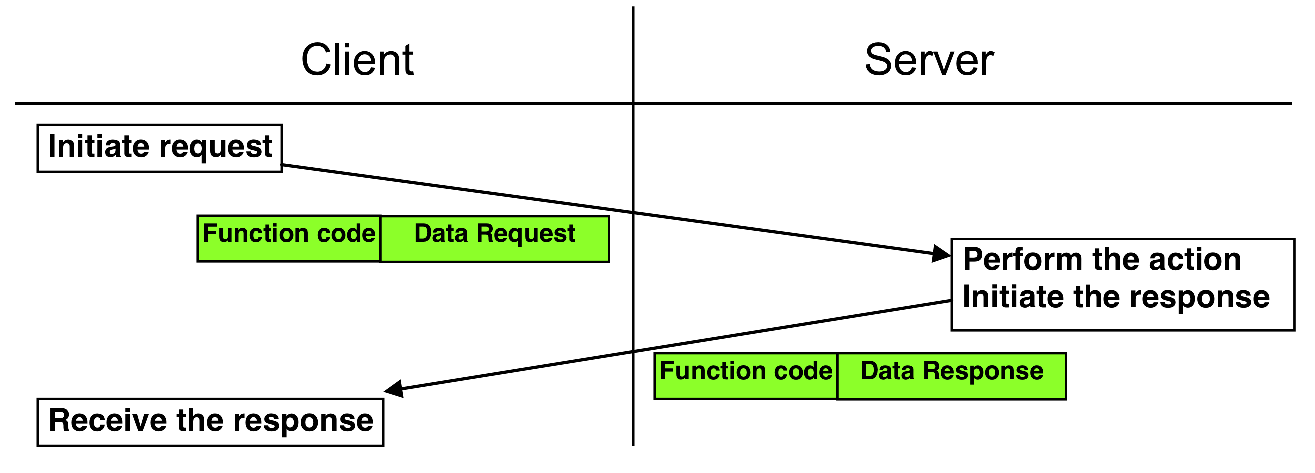
The communication is based on a simple Protocol Data Unit (PDU) defined by Modbus, which is independent of the underlying communication layers. The PDU is composed by a function code and the data. The mapping of Modbus on specific buses or network can introduce some additional fields on the Application Data Unit (ADU), as you can see in the following figure.

The protocol specification defines three types of PDU's:
- Request PDU: a code specifying a function (Function Code, 1 byte) and function specific data (Function Data, varying number of bytes)
- Response PDU: the function code corresponding to the request (Function Code, 1 byte) and response specific data (Response Data, varying number of bytes)
- Exception Response PDU: the function code corresponding to the request + 0x80 (128), (Error Code, 1 byte) and a code specifying the exception (Exception Code, 1 byte)
There are two versions of Modbus protocol:
- Modbus RTU and Modbus ASCII for serial lines communication
- Modbus TCP for Ethernet communication
Information is stored in the Slave device in four different tables: two for coils and two for registers. Each table has 9999 possible addresses. Coils are discrete values (1 bit each) and registers are numerical values (each 1 word = 16 bits = 2 bytes). The following table contains the basic Modbus data types defined by the specification.
| Coil/Register Numbers | Data Addresses | Type | Table Name |
|---|---|---|---|
| 1-9999 | 0000 to 270E | Read-Write | Discrete Output Coils |
| 10001-19999 | 0000 to 270E | Read-Only | Discrete Input Contacts |
| 30001-39999 | 0000 to 270E | Read-Only | Analog Input Registers |
| 40001-49999 | 0000 to 270E | Read-Write | Analog Output Holding Registers |
Modbus RTU
Modbus RTU (Remote Terminal Unit) is used to connect a supervisory computer with a RTU in supervisor control and data acquisition systems.
This packet is composed by four parts:
- Slave ID: the unique address from 1 to 247 (maximum number of Slaves for each master)
- Function Code: the table to access and whether to read or write
- Data
- Error check: typically CRC (Cyclic Redundancy Check) is used
Modbus TCP/IP
TCP is a connection-based protocol so a connection must be established before transferring data.
Modbus TCP simply takes a Modbus RTU message, transmits it with a TCP/IP wrapper and sends it over network instead of serial lines.
The packet is composed by six parts:
- Transition ID: 2 bytes set by the client to uniquely identify each request
- Protocol ID: 2 bytes set by the client, always 0000
- Length: 2 bytes for number of bytes in the message to follow
- Unit ID: 1 byte set by the client and echoed by the server
- Function Code: the table to access and whether to read or write
- Data
Modbus libraries for Android
There are available Java libraries that implement the Modbus protocol, the most used are:
- jLibModbus
- jamod
- j2mod
- Modbus4j
Let's have a look at some of them
jLibModbus
jLibModbus is an implementation of the Modbus protocol in Java language and it includes support for Android. Indeed, it supports the most common libraries for serial communication used in Android such as Kynetics's Android Serial SDK Extension, RXTX, jssc, jSerialComm, purejavacomm and Java Communications API. jLibModbus covers all the main features of the Modbus protocol, such as Modbus RTU, Modbus TCP, Modbus ASCII, Modbus Master and Modbus Slave.
PROS
- Actively maintained
- Support for several different serial communication libraries (Android Serial SDK Extension, jssc, RXTX, purejavacomm, Java Communications API)
- (Quite) complete implementation of the Modbus protocol.
CONS
There are no particular cons and this is a very recommended option. If we want to be picky, you may need some time to get familiar with the code and documentation sometimes unclear or lacking
jamod
This is not actually an option but for historical reasons it is worth mentioning. jamod (Java Modbus Library) is a pure Java library that can be used to implement Modbus Master and Slave both in IP and serial transport flavours. The library is well documented as it provides both complete API documentation and guidelines on how to use jamod.
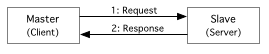
The Master is the client, which establishes a connection with the Slave (i.e. the server) and uses this connection for sending a Request to the Slave, from which a Response will be received. There can be only one Master requiring data from a source (data acquisition) or writing data to a sink (device control). The relevant Java classes to implement a Master are:
SerialConnectionfor the creation of a serial connectionModbusSerialTransactionfor the transaction which is composed byRequestandResponseSerialParametersthe parameters to be used
The Slave is a server which has a listener for receiving an incoming request from the Master which are served providing a corresponding response. The relevant Java classes to implement a Slave are:
ModbusSerialListenerthe listener for a request from a MasterDigitalIn,DigitalOut,InputRegister,Registerthe Modbus data typesSerialParametersthe parameters to be used
j2mod is a fork of the jamod 1.2 codebase and has numerous bug fixes and additional features with respect to the original project. This is likely the best choice for jamod users looking to migrate to an up-to-date library.
PROS
- Easy to use
- Fully documented
- Several usage examples available
CONS
- Very old implementation and not maintained.
- Modbus RTU relies on Java Communications API, which has no official implementation for Android. The only option is to use some port of RXTX for Android
- The library is not up-to-date, the lastest official release (1.2rc1) dates back to 2004
Serial libraries for Modbus RTU in Android
An aspect which requires particular attention when using Modbus RTU on Android is the choice of the serial communication library. Modbus and RS-485 are often mentioned together in industrial automation, but they represent different concepts.
RS-485 is a physical layer standard for serial communication. It defines electrical characteristics like voltage levels and signal transmission. RS-485 allows multiple devices to be connected on a single bus, making it suitable for industrial environments.
Modbus, on the other hand, is a communication protocol. It defines the structure of messages exchanged between devices. Modbus often uses RS-485 as its physical layer because of its robustness, however it can also use other physical layers like RS-232 or Ethernet.
RS-485 is about how the data is physically transmitted, while Modbus is about the content and format of the data being sent. We have always to be careful when we choose our library for the physical layer:
- Java/Android libraries, especially when Communications API are involved, try to abstract away how the serial device is accessed by the platform, thus requiring the use of an external library for low level serial communication
- implementations for Linux of Java serial libraries might not be easy to port to Android because of differences between the two platforms, especially regarding the compilation of the native code accessing serial port devices.
Here some options:
Android Serial SDK Extension
Android Serial SDK Extension is library that has been ported and tested specifically for Android Devices. This library bridges the gap between standard Android SDK and embedded development API. This library comes as AAR (Android Archive Library) that includes all the native artifacts for bit 32 and 64 bit embedded SOCs. The library is compatible with MAUI for .NET developers. Kynetics offers a series of Android Evaluation BSP, available for download, supporting popular SOCs and Carrier Boards. Each Evaluation BSP includes Android SDK Extensions evaluation apps including the Serial one.
PROS: 1. Android Ready 2. Supports MAUI and Xamarin based project 3. Regularly updated
CONS 1. It is a licensed commercial product
jSerialComm
jSerialComm is a library written in Java which provides a way to access standard serial ports without requiring external libraries or native code. The declared purpose of the library is to be a valid alternative to RXTX and Java Communications API. jSerialComm is platform-independent (automatically uses correct native library based on current architecture) and has the ability to open multiple ports simultaneously.
See the Javadoc Library Reference for a complete overview of jSerialComm API.
PROS
- Multi-platform
- Lightweight and efficient
- Regularly updated
CONS
- Not Android ready, it requires to be patched to be built using Android NDK
Conclusions
Android, renowned for its user-friendly interface and vast app ecosystem, has found an unexpected ally in Modbus for applications such as home automation and environment comfort in general. This industrial communication protocol, typically used in automation and control systems, is increasingly integrated into Embedded Android Systems. First you need to include support for the physical layer (i.e RS-485). An Android ready option is the Kynetics's Android Serial SDK Extension which is a commercial product. Otherwise you have jSerialComm which requires some work to be compiled on Android. For the MODBUS protocol it is recommended the use of jLibModbus which is currently maintained.
Frequently Asked Questions
What is Modbus and why is it used in industrial automation?
Modbus is an application-layer messaging protocol based on the client/server (master/slave) paradigm, designed to allow devices to exchange data reliably over serial lines or Ethernet. It is widely used in industrial automation because it is open, simple to implement, and robust in electrically noisy environments. Its longevity and broad vendor support make it a de-facto standard for connecting PLCs, sensors, and controllers.
What are the differences between Modbus RTU, ASCII, and TCP?
Modbus RTU and Modbus ASCII both operate over serial lines (e.g. RS-485 or RS-232) but differ in encoding: RTU uses compact binary framing with a CRC checksum, while ASCII uses human-readable hexadecimal characters with an LRC checksum, making it easier to debug but less bandwidth-efficient. Modbus TCP wraps the Modbus PDU in a standard TCP/IP packet for transmission over Ethernet, removing the need for serial hardware and adding a transaction identifier to correlate requests and responses.
How can I use Modbus serial (RTU/ASCII) on Android?
To use Modbus RTU or ASCII on Android you need two components: a serial communication library that can access the hardware UART, and a Modbus protocol library built on top of it. Kynetics' Android Serial SDK Extension provides hardware serial access on Kynetics BSP devices and integrates directly with jLibModbus. Alternatively, jSerialComm can be used after being patched to build with the Android NDK.
Does Android natively support serial port communication for Modbus?
Android does not expose serial port hardware through a standard SDK API, which is why specialised libraries are required. Standard Java serial APIs (e.g. Java Communications API, RXTX) cannot be used directly on Android because they depend on native code compiled for desktop Linux, not for Android's Bionic runtime. A library such as Kynetics' Android Serial SDK Extension or a patched build of jSerialComm is therefore necessary for Modbus RTU/ASCII communication on Android hardware.
What Kynetics tools are available for Modbus on Android?
Kynetics provides the Android Serial SDK Extension, a commercial AAR library that offers hardware serial port access on Kynetics BSP-powered devices, including support for MAUI/.NET and Xamarin projects. It is distributed as part of the Android Evaluation BSP packages available for popular SOCs and carrier boards. For the Modbus protocol layer, Kynetics recommends pairing the Serial SDK Extension with jLibModbus, which explicitly supports it as a serial transport back-end.
Enjoy the Art of Coding™