Introduction to dm-verity on Android
Introduction: what is dm-verity?
Android 4.4 introduced a number of security enhancements, most notably SELinux in enforcing mode and verified boot.
Android's verified boot implementation is based on the dm-verity device-mapper block integrity checking target. Device-mapper is a Linux kernel framework that provides a generic way to implement virtual block devices. It is used to implement volume management (LVM) and full-disk encryption (dm-crypt). Device-mapper works by essentially mapping a virtual block device to one or more physical block devices, optionally modifying transferred data in transit. For example, dm-crypt decrypts read physical blocks and encrypts written blocks before committing them to disk. Thus disk encryption is transparent to users of the virtual DM-Crypt block device. Device-mapper targets can be stacked on top of each other, making it possible to implement complex data transformations.
In this context, dm-verity is a block integrity checking target: it was initially developed as part of the Google's Chromium OS project with the purpose to implement a device mapper target capable of validating the data blocks contained in a file system. This means that it verifies the integrity of each device block as it is being read from disk. If the block checks out, the read succeeds, and if not the read generates an I/O error as if the block was physically corrupt. As for dm-crypt, this process is transparent to the applications reading those blocks.
The final purpose of dm-verity is to guarantee the integrity of a volume against corruption or malicious attacks.
At a glance
Topic: Android dm-verity verified boot · Kernel feature: device-mapper block integrity · Platform: Android (all versions with AVB)
dm-verity verifies the integrity of every block read from the Android system partition against a pre-calculated hash tree, preventing tampering even if an attacker has physical access to the device. This article covers how it works and how to enable it.
How does it work?
Under the hood dm-verity is implemented using a pre-calculated hash tree which includes the hashes of all device blocks. The leaf nodes of the tree include hashes of physical device blocks, while intermediate nodes are hashes of their child nodes (hashes of hashes). The root node is called the root hash and is based on all hashes in lower levels.
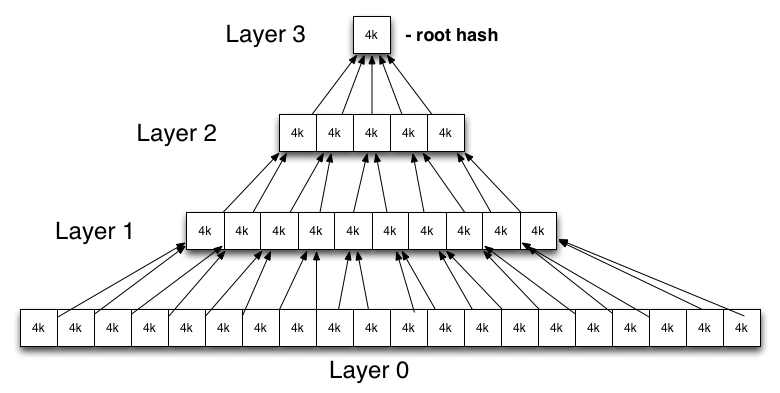
A change even in a single device block will result in a change of the root hash. Therefore in order to verify a hash tree we only need to verify its root hash.
Like Chrome OS, Android also uses the kernel's DM-Verity target, but the cryptographic verification of the root hash and mounting of verified partitions are implemented differently from Chrome OS.
The RSA public key used for verification is embedded in the boot partition under the verity_key filename and is used to verify the dm-verity mapping table. This mapping table holds the locations of the target device and the offset of the hash table, as well as the root hash and salt. The mapping table and its signature are part of the verity metablock which is written to disk directly after the last file system block of the target device.
A partition is marked as verifiable by adding the verify flag to the Android-specific fs_mgr flags filed in the device's fstab file. When Android's file system manager encounters the verify flag in fstab, it loads the verity metadata from the block device specified in fstab and verifies its signature using the verity_key. If the signature check succeeds, the file system manager parses the dm-verity mapping table and passes it to the Linux device-mapper, which use the information contained in the mapping table in order to create a virtual dm-verity block device. This virtual block device is then mounted at the mount point specified in fstab in place of the corresponding physical device.
As a result, all reads from the underlying physical device are transparently verified against the pre-generated hash tree. Modifying or adding files, or even remounting the partition in read-write mode, results in an integrity verification failure and an I/O error.
The official Google documentation describes the steps required to enable verified boot on Android. Here is a summary of that:
- generate the hash tree. This is done at build time, to avoid any other changes to the system image;
- build and sign the dm-verity table: this table is a string that contains the name of the block device, block sizes, offsets, salt and root hash values from the hash tree of the system image;
- build the verity metadata block: it includes a magic number and the metadata format version, followed by the signature blob of the dm-verity table and the dm-verity table itself;
- write the verity metadata block after the last file system block in the system partition, and write the hash tree after that;
- include in the boot image the verification key used to sign the dm-verity table;
- enable the verified boot in the fstab for the system partition.
During normal use of the device, every block that is read will be checked against the hashes present in the hash tree: if there are differences, dm-verity will generate an I/O error and it will make the corrupted blocks unreadable.
For performance reasons, when read into memory, the block is hashed in parallel. The hash is then verified up the tree. And since reading the block is such an expensive operation, the latency introduced by this block-level verification is as low as possible.
Forward error correction (FEC)
While dm-verity sounds great against malicious attacks, it also means that a detected single byte corruption will result in an entire block becoming inaccessible, leading to the kernel returning I/O errors to userspace on verified partition data access. This could, in theory, also lead to unreadable (safe) files.
For this reason, while everything said until now is valid from Android 4.4 onwards, there are some further changes to how a device behaves when dm-verity is enabled from Android 7.0: one of those is the forward error correction (FEC).
A benefit of the integrity verification already performed by dm-verity, is that it's possible to tell exactly where the errors are in case of corruption. So, using some error correction codes, it's technically possible to recover damaged files. If the FEC is enabled, the error-correcting codes (Reed–Solomon in the Android case) are spread over the entire partition, shipping redundant encoding data with the system image: this makes it possible for devices to recover from the loss of up to 16-24 MiB of consecutive blocks anywhere on a typical 2-3 GiB system partition with only 0.8% space overhead and no performance impact unless corruption is detected. This improves both the security and reliability of devices running Android.
Android verified boot
As dm-verity is a kernel feature, in order for the integrity protection it provides to be effective, the kernel which the device boots needs to be trusted. On Android, this means verifying the boot partition, which also includes the root file system RAM disk and the verity public key. This process is device-specific and is typically implemented in the device bootloader, usually by using an unmodifiable verification key stored in hardware to verify the boot partition's signature.
On Android this is called verified boot, the Google implementation of chain of trust: verified boot guarantees the integrity of the device software starting (ideally) from a hardware root of trust up to the system partition. During boot, each stage verifies the integrity and authenticity of the next stage before executing it.
Summary
dm-verity
- transparent integrity checking for block devices
- read error if block integrity check fails
- try to recover damaged blocks (from Android 7.0)
- useful for read-only partitions like system
- fundamental part of verified boot on Android
Verified boot
- device software integrity based on hardware root of trust
- Boot chain (simplified)
- verify bootloader using a hardware root of trust
- bootloader verifies boot and recovery partition
- kernel verifies system partition
- uses dm-verity for the integrity checks once execution has moved to the boot partition
Frequently Asked Questions
What is dm-verity and what does it protect against?
dm-verity is a Linux device-mapper target that provides transparent, block-level integrity verification for read-only partitions. It protects against unauthorized modification of partition data — including rootkits, malicious firmware updates, and physical storage tampering — by verifying each data block against a pre-calculated hash tree before exposing it to userspace.
How does dm-verity use hash trees to verify blocks?
dm-verity builds a hash tree over all blocks in the target partition. Leaf nodes contain the cryptographic hashes of individual data blocks, while each intermediate node holds the hash of its children, all the way up to a single root hash. The root hash is signed and stored in a trusted location. When any block is read, its hash is recomputed and verified up the tree — a change in any single block will cascade to a different root hash and be detected immediately.
What is the difference between dm-verity and dm-crypt?
dm-crypt provides confidentiality by transparently encrypting and decrypting data as it passes between a physical block device and userspace, but does not verify integrity. dm-verity provides integrity by detecting tampering with block data, but does not encrypt it. The two device-mapper targets can be stacked, allowing a partition to be both encrypted and integrity-verified simultaneously.
How do I enable dm-verity on Android?
Enabling dm-verity on Android requires generating a hash tree for the system partition at build time, building and signing a dm-verity mapping table, writing the verity metadata block and hash tree to disk after the last filesystem block, embedding the RSA verification key in the boot image under the verity_key filename, and adding the verify flag to the relevant entry in the device's fstab file. The Android build system and verity_signer tool automate most of these steps.
What happens when dm-verity detects a corrupted block?
When dm-verity detects a hash mismatch for a block, it returns an I/O error to the requesting process, exactly as if the storage media were physically damaged. From Android 7.0 onwards, if Forward Error Correction (FEC) is enabled, dm-verity first attempts to recover the corrupted data using Reed–Solomon error-correcting codes before escalating to an I/O error, allowing recovery of up to 16–24 MiB of consecutive corrupted blocks with minimal space overhead.